
Main Page: Difference between revisions
No edit summary |
No edit summary |
||
| (270 intermediate revisions by the same user not shown) | |||
| Line 1: | Line 1: | ||
<div | {{#seo: | ||
|title=BorderConnect Support Wiki {{!}} ACE & ACI eManifest Guides | |||
|title_mode=replace | |||
|keywords=BorderConnect wiki, ACE manifest guide, ACI eManifest support, U.S. in-bond filing, customs compliance software, cross-border trucking, PARS tracking, PAPS labels, CBSA, CBP | |||
|description=Welcome to the official BorderConnect Support Wiki. Explore comprehensive guides, troubleshooting steps, and video tutorials for ACE Manifests, ACI eManifests, and cross-border customs compliance. | |||
}} | |||
__NOTITLE____NOTOC____NOEDITSECTION__<div class="bc-wrap"><div class="bc-hero"> | |||
<h1>How can we help you?</h1> | |||
<p>Search the [[BorderConnect_Wiki:About|<span style="color:white; text-decoration:underline;">BorderConnect</span>]] Knowledge Base or browse the guides below.</p> | |||
<div id=" | <div id="bc-hero-search"></div> | ||
<div | <div class="bc-hero-pills"><span class="plainlinks">[[ACI_eManifest_Software_User_Guide_(CBSA)|<span class="bc-hero-pill">ACI eManifest Software User Guide</span>]]</span><span class="plainlinks">[[ACE_Manifest_Software_User_Guide_(CBP)|<span class="bc-hero-pill">ACE Manifest Software User Guide</span>]]</span><span class="plainlinks">[[US_In_Bond_Manager_Guide_(CBP)|<span class="bc-hero-pill">U.S. In-Bond Manager Guide</span>]]</span><span class="plainlinks">[[PARS_(CBSA_Shipment_Type)|<span class="bc-hero-pill">PARS (CBSA Shipment Type)</span>]]</span><span class="plainlinks">[[PAPS_(CBP_Shipment_Type)|<span class="bc-hero-pill">PAPS (CBP Shipment Type)</span>]]</span><span class="plainlinks">[[Correcting_Rejected_ACI_eManifests_(ACI_eManifest)|<span class="bc-hero-pill">Correcting Rejected ACI eManifests</span>]]</span><span class="plainlinks">[[Correcting_Rejected_ACE_Manifests_(ACE_Manifest)|<span class="bc-hero-pill">Correcting Rejected ACE Manifests</span>]]</span><span class="plainlinks">[[BorderConnect_Software_User_Guide|<span class="bc-hero-pill">BorderConnect Software User Guide</span>]]</span></div> | ||
< | |||
<div | <div class="bc-meta"> | ||
Browsing [[Special:Statistics|{{NUMBEROFARTICLES}} articles]] and [[Special:MediaStatistics|{{NUMBEROFFILES}} images]] for BorderConnect customers. | |||
</div> | </div> | ||
</div> | </div> | ||
<div | <div class="bc-2col"> | ||
{{ | <div class="bc-card"> | ||
<h2>{{Icon|rocket|color=#266065}} New to BorderConnect?</h2> | |||
<div class="bc-subtle">Start here to get compliant fast with the least friction.</div> | |||
<div class="bc-btngrid"> | |||
<div class="bc-btn"> | |||
<div class="bc-btn-icon">{{Icon|clipboard-list}}</div> | |||
<div class="bc-btn-content"> | |||
<strong>Step 1: Onboarding</strong> | |||
[[BorderConnect_Onboarding_and_Readiness_Guide|Readiness Guide]] | |||
</div> | |||
</div> | |||
<div class="bc-btn"> | |||
<div class="bc-btn-icon">{{Icon|user-plus}}</div> | |||
<div class="bc-btn-content"> | |||
<strong>Step 2: Registering</strong> | |||
[[How_To_Register_With_BorderConnect|Register Account]] | |||
</div> | |||
</div> | </div> | ||
<div | <div class="bc-btn"> | ||
<div | <div class="bc-btn-icon">{{Icon|laptop-code}}</div> | ||
<div class="bc-btn-content"> | |||
<strong>Step 3: The Basics</strong> | |||
[[BorderConnect_Software_User_Guide|Software User Guide]] | |||
</div> | |||
</div> | |||
< | <div class="bc-btn"> | ||
<div class="bc-btn-icon">{{Icon|canadian-maple-leaf|type=fa-brands}}</div> | |||
<div class="bc-btn-content"> | |||
<strong>Step 4: First ACI</strong> | |||
[[Creating_and_Submitting_a_New_ACI_eManifest_(ACI_eManifest)|Create ACI Manifest]] | |||
</div> | |||
</div> | |||
<div | <div class="bc-btn"> | ||
<div class="bc-btn-icon">{{Icon|flag-usa}}</div> | |||
<div class="bc-btn-content"> | |||
<strong>Step 5: First ACE</strong> | |||
[[Creating_and_Submitting_a_New_ACE_Manifest_(ACE_Manifest)|Create ACE Manifest]] | |||
</div> | |||
</div> | |||
</div> | |||
</div> | </div> | ||
<div | <div class="bc-card"> | ||
<h2 | <h2>{{Icon|toolbox|color=#266065}} Common Tasks</h2> | ||
<div class="bc-subtle">Quick links to what you are trying to accomplish today.</div> | |||
<div | <div class="bc-btngrid"> | ||
<div | <div class="bc-btn"> | ||
<div class="bc-btn-icon">{{Icon|screwdriver-wrench}}</div> | |||
<div class="bc-btn-content"> | |||
[[Correcting Rejected ACI eManifests (ACI eManifest)|Fix a Rejected ACI]] | |||
</div> | </div> | ||
</div> | </div> | ||
<div | <div class="bc-btn"> | ||
<div | <div class="bc-btn-icon">{{Icon|screwdriver-wrench}}</div> | ||
<div class="bc-btn-content"> | |||
[[Correcting_Rejected_ACE_Manifests_(ACE_Manifest)|Fix a Rejected ACE]] | |||
</div> | |||
</div> | |||
< | <div class="bc-btn"> | ||
<div class="bc-btn-icon">{{Icon|print}}</div> | |||
<div class="bc-btn-content"> | |||
[[Generating_ACE_and_ACI_eManifest_Lead_Sheets_(CBP_and_CBSA)|Print Lead Sheets]] | |||
</div> | |||
</div> | |||
<div | <div class="bc-btn"> | ||
<div class="bc-btn-icon">{{Icon|magnifying-glass-location}}</div> | |||
<div class="bc-btn-content"> | |||
[[E-Manifest_Tracking_Feature_(ACE_and_ACI_eManifest)|Track Shipment Status]] | |||
</div> | |||
</div> | |||
< | <div class="bc-btn"> | ||
<div | <div class="bc-btn-icon">{{Icon|arrows-rotate}}</div> | ||
<div class="bc-btn-content"> | |||
[[E-Manifest_Sync_Feature_(ACE_and_ACI_eManifest)|Sync & Edit Manifest]] | |||
</div> | |||
</div> | </div> | ||
<div | <div class="bc-btn"> | ||
< | <div class="bc-btn-icon">{{Icon|file-pen}}</div> | ||
<div class="bc-btn-content"> | |||
[[US_In_Bond_Manager_Guide_(CBP)|File U.S. In-Bond]] | |||
</div> | |||
</div> | |||
</div> | |||
</div> | </div> | ||
</div> | </div> | ||
<div class="bc-card" style="margin-bottom: 30px;"> | |||
<div class="bc-2col" style="margin-bottom: 0; align-items: center;"> | |||
<div style="flex: 1; min-width: 300px;"> | |||
<h2 style="margin-top: 0;">{{Icon|circle-play|color=#266065}} Video Tutorials</h2> | |||
<div class="bc-subtle" style="margin-bottom: 25px;">Watch step-by-step walkthroughs to master the platform.</div> | |||
<div class="bc-cleanlist"> | |||
<ul> | |||
<li>[https://www.youtube.com/watch?v=BHFylIHdtXc&list=PLQOGduPMk-2bXZWioPJEkh9f2uzlEOZQG ACI eManifest Tutorials]</li> | |||
<li>[https://www.youtube.com/watch?v=qA1bJAuAUTI&list=PLQOGduPMk-2al0wBZZ4QEtbkZie0R-lFU ACE Manifest Tutorials]</li> | |||
<li>[https://www.youtube.com/playlist?list=PLQOGduPMk-2Yz8S-4Ft-ssBXi3lm1gYln U.S. In-Bond Tutorials]</li> | |||
<li>[https://www.youtube.com/playlist?list=PLQOGduPMk-2YrdzXavRyI__exPjr-ZHVE General Software Tutorials]</li> | |||
<li>[https://www.youtube.com/@BorderConnect '''Visit BorderConnect YouTube Channel''']</li> | |||
</ul> | |||
</div> | |||
</div> | |||
<div style="flex: 1; min-width: 300px; display: flex; flex-direction: column; align-items: center; justify-content: center;"> | |||
<div style="width: 100%; max-width: 450px;"> | |||
<div class="bc-video-trigger" data-video-id="p-RKs3izmCs" style="box-shadow: 0 10px 20px rgba(0,0,0,0.15);"> | |||
<div class="bc-play-icon"><i class="fas fa-play-circle"></i></div> | |||
</div> | |||
<div style="margin-top: 15px; text-align: center; font-family: sans-serif;"> | |||
<div style="color: #266065; font-size: 0.75rem; font-weight: 700; text-transform: uppercase; letter-spacing: 1px; margin-bottom: 4px;">Featured Tutorial</div> | |||
<div style="color: #2c3e50; font-size: 1.1rem; font-weight: 600;">QP In-Bond Filing</div> | |||
</div> | |||
</div> | |||
</div> | |||
</div> | |||
</div> | |||
{{AppPromo}} | |||
<div class="bc-2col"> | |||
<div | <div class="bc-card bc-cleanlist"> | ||
<div | <h2>{{Icon|canadian-maple-leaf|type=fa-brands|color=#266065}} ACI eManifest Guide</h2> | ||
<div class="bc-subtle">Comprehensive docs for CBSA (Canada) shipments.</div> | |||
* [[Creating_and_Submitting_a_New_ACI_eManifest_(ACI_eManifest)|Creating and Submitting ACI]] | |||
* [[Correcting Rejected ACI eManifests (ACI eManifest)|Troubleshoot Rejections]] | |||
* [[In Bond (CBSA Shipment Type)|Creating In-Bond (Canada)]] | |||
* [[Shipment Types For ACE and ACI eManifest|Shipment Types (PARS, etc.)]] | |||
* [[CBSA Highway Ports|CBSA Port Codes]] | |||
<div class="bc-did-you-know"> | |||
<h3>Did you know?</h3> | |||
An '''[[Generating_ACE_and_ACI_eManifest_Lead_Sheets_(CBP_and_CBSA)|ACI Lead Sheet]]''' is required for every entry. BorderConnect can auto-generate these for you. | |||
</div> | |||
</div> | |||
< | <div class="bc-card bc-cleanlist"> | ||
<h2>{{Icon|star|color=#266065}} ACE Manifest Guide</h2> | |||
<div class="bc-subtle">Comprehensive docs for CBP (USA) shipments.</div> | |||
* [[Creating_and_Submitting_a_New_ACE_Manifest_(ACE_Manifest)|Creating and Submitting ACE]] | |||
* [[Correcting_Rejected_ACE_Manifests_(ACE_Manifest)|Troubleshoot Rejections]] | |||
* [[ACE_In_Bond_(CBP_Shipment_Type)|Creating In-Bond (USA)]] | |||
* [[Shipment_Types_For_ACE_and_ACI_eManifest|Shipment Types (PAPS, etc.)]] | |||
* [[CBP Highway Ports|CBP Port Codes]] | |||
<div | <div class="bc-did-you-know"> | ||
<h3>Did you know?</h3> | |||
'''[[Creating_and_Managing_Insurance_Policies_(ACE_Manifest)|Insurance Policies]]''' are mandatory if you are hauling hazardous goods into the U.S. | |||
</div> | |||
</div> | |||
</div> | </div> | ||
<div | <div class="bc-2col"> | ||
<div | <div class="bc-card bc-cleanlist"> | ||
< | <h2>{{Icon|warehouse|color=#266065}} U.S. In-Bond Manager</h2> | ||
<div class="bc-subtle">QP In-Bonds, Diversions, and Arrivals.</div> | |||
* [[US_In_Bond_Manager_Guide_(CBP)|User Guide Overview]] | |||
* [[In_Bond_Manager_Dashboard_(U.S._In-Bond_Manager)|The Dashboard]] | |||
* [[Reporting_In_Bond_Arrivals_and_Exports_(U.S._In-Bond_Manager)|Reporting Arrivals/Exports]] | |||
* [[Send_In-Bond_Port_Diversion_Page_(U.S._In-Bond_Manager)|Port Diversions]] | |||
<div | <div class="bc-did-you-know"> | ||
<h3>Did you know?</h3> | |||
If a driver needs to change destinations after arriving in the U.S., you must file a '''[[Send_In-Bond_Port_Diversion_Page_(U.S._In-Bond_Manager)|Port Diversion]]''' rather than canceling the bond. | |||
</div> | </div> | ||
</div> | </div> | ||
<div class="bc-card bc-cleanlist"> | |||
<h2>{{Icon|gears|color=#266065}} Advanced Tools</h2> | |||
<div class="bc-subtle">Admin, Fleet Management, and RNS.</div> | |||
* [[Creating_and_Maintaining_Truck_Profiles_(ACE_and_ACI_eManifest)|Manage Trucks]] & [[Creating_and_Maintaining_Driver_Profiles_(ACE_and_ACI_eManifest)|Drivers]] | |||
* [[PARS_Checking_Software_User_Guide_(CBSA_Shipments)|RNS-PARS Software]] | |||
* [[Warehouse_Arrival_Certification_Message_(WACM)_Guide_(CBSA)|WACM Guide]] | |||
* [[Customs_Compliance_Guide_(CBP_and_CBSA)|Customs Compliance Guide]] | |||
<div | <div class="bc-did-you-know"> | ||
< | <h3>Did you know?</h3> | ||
BorderConnect '''[[PARS_Checking_Software_User_Guide_(CBSA_Shipments)|RNS-PARS]]''' can automatically send text messages or emails to your drivers the exact moment their shipment is released by CBSA. | |||
</div> | |||
</div> | |||
</div> | </div> | ||
<h2 | {{BorderPrintPromo}} | ||
<div class="bc-card bc-featured-card" style="margin-top: 30px; background: linear-gradient(135deg, #e8f1f2 0%, #ffffff 100%); border: 1px solid #c8dadd;"> | |||
<h2 style="border-bottom: 2px solid rgba(38, 96, 101, 0.1); padding-bottom: 12px;"> | |||
<i class="fas fa-file-invoice" style="margin-right: 10px; color: #266065;"></i> Featured: Assigning ACE In-Bond Info | |||
</h2> | |||
<div class="bc-subtle" style="margin-bottom: 20px;">Critical guide for managing in-bond shipments within the ACE eManifest system.</div> | |||
<div class="bc-featured-flex" style="display: flex; gap: 30px; align-items: flex-start; flex-wrap: wrap;"> | |||
<div class="bc-screenshot-frame" style="flex: 0 0 450px; max-width: 100%; margin: 0;"> | |||
[[Image:Aceinbond3.png|450px|left|link=ACE_In_Bond_(CBP_Shipment_Type)]] | |||
</div> | |||
<div | <div class="bc-featured-content" style="flex: 1; min-width: 300px;"> | ||
<p style="max-width: none;"> | |||
Mastering the ACE In-Bond process is essential for carriers moving goods through the United States without paying duties. This guide breaks down the critical <strong>Assign In-Bond Information</strong> screen, showing you exactly how to configure the <strong>Entry Type</strong> (such as 61 IT or 62 T&E), manage paper in-bond numbers, and set the correct Foreign Destination to ensure full CBP compliance. | |||
</p> | |||
<p style="max-width: none;"> | |||
When creating an ACE Shipment that requires in-bond information, this screen allows you to add the necessary <strong>Entry Number</strong> and <strong>Foreign Destination</strong> data required for a successful transmission. Understanding these fields prevents rejected manifests and ensures your goods move seamlessly across the border under customs control. | |||
[[ACE_In_Bond_(CBP_Shipment_Type)|<span style="font-weight: bold; color: #266065; margin-left: 5px;">Read More...</span>]] | |||
</p> | |||
</div> | |||
</div> | |||
</div> | </div> | ||
<div | <div class="bc-hero" style="margin-top:40px; padding:30px; background:white; color:var(--bc-text); border:1px solid var(--bc-border); box-shadow:none;"> | ||
<h2 | <h2 style="color:var(--bc-text); border:none;">Connect with BorderConnect</h2> | ||
<div class="bc-linkgrid"> | |||
<div class="bc-linktile">[https://www.borderconnect.com <span class="bc-linkicon">{{Icon|globe|color=#266065}}</span><span class="bc-linktext"><span class="bc-linktitle">Website</span><span class="bc-linkdesc">Official Product Info</span></span>]</div> | |||
<div class="bc-linktile">[https://www.facebook.com/BorderConnect <span class="bc-linkicon">{{Icon|facebook|type=fa-brands|color=#266065}}</span><span class="bc-linktext"><span class="bc-linktitle">Facebook</span><span class="bc-linkdesc">News & Community</span></span>]</div> | |||
<div class="bc-linktile">[https://www.instagram.com/borderconnect/ <span class="bc-linkicon">{{Icon|instagram|type=fa-brands|color=#266065}}</span><span class="bc-linktext"><span class="bc-linktitle">Instagram</span><span class="bc-linkdesc">Behind the Scenes</span></span>]</div> | |||
<div class="bc-linktile">[https://bsky.app/profile/borderconnect.com <span class="bc-linkicon">{{Icon|bluesky|type=fa-brands|color=#266065}}</span><span class="bc-linktext"><span class="bc-linktitle">Bluesky</span><span class="bc-linkdesc">Industry Updates</span></span>]</div> | |||
<div class="bc-linktile">[https://www.youtube.com/@BorderConnect <span class="bc-linkicon">{{Icon|youtube|type=fa-brands|color=#266065}}</span><span class="bc-linktext"><span class="bc-linktitle">YouTube</span><span class="bc-linkdesc">Video Tutorials</span></span>]</div> | |||
<div class="bc-linktile">[https://www.linkedin.com/company/borderconnect <span class="bc-linkicon">{{Icon|linkedin|type=fa-brands|color=#266065}}</span><span class="bc-linktext"><span class="bc-linktitle">LinkedIn</span><span class="bc-linkdesc">Company News</span></span>]</div> | |||
<div | <div class="bc-linktile">[https://www.borderprint.com <span class="bc-linkicon">{{Icon|print|color=#266065}}</span><span class="bc-linktext"><span class="bc-linktitle">BorderPrint</span><span class="bc-linkdesc">Forms, Labels & Seals</span></span>]</div> | ||
< | |||
<div | <div class="bc-linktile">[https://emanifest.app <span class="bc-linkicon">{{Icon|mobile-alt|color=#266065}}</span><span class="bc-linktext"><span class="bc-linktitle">eManifest App</span><span class="bc-linkdesc">iOS & Android</span></span>]</div> | ||
< | |||
<div> | </div> | ||
</div> | |||
</div> | </div> | ||
Latest revision as of 14:26, 24 February 2026
How can we help you?
Search the BorderConnect Knowledge Base or browse the guides below.
New to BorderConnect?
Step 1: Onboarding Readiness Guide
Step 2: Registering Register Account
Step 3: The Basics Software User Guide
Step 4: First ACI Create ACI Manifest
Step 5: First ACE Create ACE Manifest
Common Tasks
Video Tutorials
ACI eManifest Guide
- Creating and Submitting ACI
- Troubleshoot Rejections
- Creating In-Bond (Canada)
- Shipment Types (PARS, etc.)
- CBSA Port Codes
Did you know?
An ACI Lead Sheet is required for every entry. BorderConnect can auto-generate these for you.
ACE Manifest Guide
- Creating and Submitting ACE
- Troubleshoot Rejections
- Creating In-Bond (USA)
- Shipment Types (PAPS, etc.)
- CBP Port Codes
Did you know?
Insurance Policies are mandatory if you are hauling hazardous goods into the U.S.
U.S. In-Bond Manager
Did you know?
If a driver needs to change destinations after arriving in the U.S., you must file a Port Diversion rather than canceling the bond.
Advanced Tools
Did you know?
BorderConnect RNS-PARS can automatically send text messages or emails to your drivers the exact moment their shipment is released by CBSA.
Featured: Assigning ACE In-Bond Info
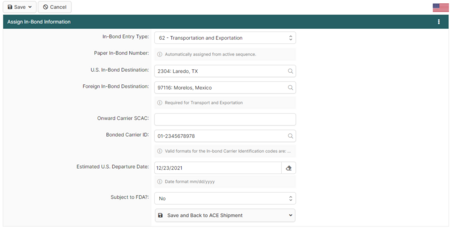
Mastering the ACE In-Bond process is essential for carriers moving goods through the United States without paying duties. This guide breaks down the critical Assign In-Bond Information screen, showing you exactly how to configure the Entry Type (such as 61 IT or 62 T&E), manage paper in-bond numbers, and set the correct Foreign Destination to ensure full CBP compliance.
When creating an ACE Shipment that requires in-bond information, this screen allows you to add the necessary Entry Number and Foreign Destination data required for a successful transmission. Understanding these fields prevents rejected manifests and ensures your goods move seamlessly across the border under customs control. Read More...