|
|
| (104 intermediate revisions by the same user not shown) |
| Line 1: |
Line 1: |
| __NOTITLE__
| | {{#seo: |
| __NOTOC____NOEDITSECTION__
| | |title=BorderConnect Support Wiki {{!}} ACE & ACI eManifest Guides |
| | |title_mode=replace |
| | |keywords=BorderConnect wiki, ACE manifest guide, ACI eManifest support, U.S. in-bond filing, customs compliance software, cross-border trucking, PARS tracking, PAPS labels, CBSA, CBP |
| | |description=Welcome to the official BorderConnect Support Wiki. Explore comprehensive guides, troubleshooting steps, and video tutorials for ACE Manifests, ACI eManifests, and cross-border customs compliance. |
| | }} |
| | __NOTITLE____NOTOC____NOEDITSECTION__<div class="bc-wrap"><div class="bc-hero"> |
| | <h1>How can we help you?</h1> |
| | <p>Search the [[BorderConnect_Wiki:About|<span style="color:white; text-decoration:underline;">BorderConnect</span>]] Knowledge Base or browse the guides below.</p> |
|
| |
|
| <style> | | <div id="bc-hero-search"></div> |
| /* ===== BorderConnect Main Page (Modern Portal) ===== */
| |
| .bc-wrap { max-width: 1200px; margin: 0 auto; }
| |
| .bc-hero {
| |
| background: linear-gradient(135deg,#226065 0%, #1f4b4f 60%, #17373a 100%);
| |
| border-radius: 16px;
| |
| padding: 22px 22px 18px 22px;
| |
| color: #fff;
| |
| box-shadow: 0 10px 30px rgba(0,0,0,.15);
| |
| }
| |
| .bc-hero h1 { margin: 0 0 6px 0; font-size: 28px; }
| |
| .bc-hero p { margin: 0; opacity: .92; font-size: 15px; max-width: 900px; }
| |
| .bc-hero .bc-meta { margin-top: 10px; font-size: 13px; opacity: .9; }
| |
| .bc-grid { display: grid; grid-template-columns: 1fr; gap: 14px; margin-top: 14px; }
| |
| @media (min-width: 980px) { .bc-grid { grid-template-columns: 1fr 1fr; } }
| |
| .bc-card {
| |
| background: #fff;
| |
| border: 1px solid rgba(0,0,0,.08);
| |
| border-radius: 14px;
| |
| padding: 16px 16px 14px 16px;
| |
| box-shadow: 0 8px 20px rgba(0,0,0,.06);
| |
| }
| |
| .bc-card h2 { margin: 0 0 10px 0; font-size: 18px; }
| |
| .bc-card h3 { margin: 14px 0 8px 0; font-size: 15px; }
| |
| .bc-subtle { color: #555; font-size: 13px; line-height: 1.45; }
| |
| .bc-pillrow { display: flex; flex-wrap: wrap; gap: 8px; margin-top: 10px; }
| |
| .bc-pill {
| |
| display: inline-block;
| |
| padding: 6px 10px;
| |
| border-radius: 999px;
| |
| border: 1px solid rgba(0,0,0,.10);
| |
| background: rgba(0,0,0,.02);
| |
| font-size: 13px;
| |
| white-space: nowrap;
| |
| }
| |
| .bc-pill a { text-decoration: none; }
| |
| .bc-accent-aci { border-left: 6px solid #2563eb; }
| |
| .bc-accent-ace { border-left: 6px solid #dc2626; }
| |
| .bc-accent-ib { border-left: 6px solid #7c3aed; }
| |
| .bc-accent-soft { border-left: 6px solid #0f766e; }
| |
| .bc-accent-ref { border-left: 6px solid #334155; }
| |
| .bc-accent-onboard { border-left: 6px solid #f59e0b; }
| |
|
| |
|
| .bc-2col { display: grid; gap: 12px; grid-template-columns: 1fr; } | | <div class="bc-hero-pills"><span class="plainlinks">[[ACI_eManifest_Software_User_Guide_(CBSA)|<span class="bc-hero-pill">ACI eManifest Software User Guide</span>]]</span><span class="plainlinks">[[ACE_Manifest_Software_User_Guide_(CBP)|<span class="bc-hero-pill">ACE Manifest Software User Guide</span>]]</span><span class="plainlinks">[[US_In_Bond_Manager_Guide_(CBP)|<span class="bc-hero-pill">U.S. In-Bond Manager Guide</span>]]</span><span class="plainlinks">[[PARS_(CBSA_Shipment_Type)|<span class="bc-hero-pill">PARS (CBSA Shipment Type)</span>]]</span><span class="plainlinks">[[PAPS_(CBP_Shipment_Type)|<span class="bc-hero-pill">PAPS (CBP Shipment Type)</span>]]</span><span class="plainlinks">[[Correcting_Rejected_ACI_eManifests_(ACI_eManifest)|<span class="bc-hero-pill">Correcting Rejected ACI eManifests</span>]]</span><span class="plainlinks">[[Correcting_Rejected_ACE_Manifests_(ACE_Manifest)|<span class="bc-hero-pill">Correcting Rejected ACE Manifests</span>]]</span><span class="plainlinks">[[BorderConnect_Software_User_Guide|<span class="bc-hero-pill">BorderConnect Software User Guide</span>]]</span></div> |
| @media (min-width: 980px) { .bc-2col { grid-template-columns: 1fr 1fr; } }
| |
|
| |
|
| .bc-btngrid { display:grid; grid-template-columns: 1fr; gap:10px; margin-top: 10px;}
| | <div class="bc-meta"> |
| @media (min-width: 980px) { .bc-btngrid { grid-template-columns: 1fr 1fr; } }
| | Browsing [[Special:Statistics|{{NUMBEROFARTICLES}} articles]] and [[Special:MediaStatistics|{{NUMBEROFFILES}} images]] for BorderConnect customers. |
| .bc-btn {
| | </div> |
| display:block;
| | </div> |
| padding: 10px 12px;
| |
| border-radius: 12px;
| |
| border: 1px solid rgba(0,0,0,.10);
| |
| background: linear-gradient(180deg, rgba(255,255,255,1) 0%, rgba(0,0,0,.02) 100%);
| |
| box-shadow: 0 6px 14px rgba(0,0,0,.06);
| |
| text-decoration: none !important;
| |
| }
| |
| .bc-btn strong { display:block; font-size: 14px; margin-bottom: 2px; }
| |
| .bc-btn span { display:block; font-size: 12px; color:#555; }
| |
|
| |
|
| .bc-kicker { font-size: 12px; letter-spacing: .06em; text-transform: uppercase; color: rgba(255,255,255,.85); margin-top: 8px; } | | <div class="bc-2col"> |
| | <div class="bc-card"> |
| | <h2>{{Icon|rocket|color=#266065}} New to BorderConnect?</h2> |
| | <div class="bc-subtle">Start here to get compliant fast with the least friction.</div> |
| | |
| | <div class="bc-btngrid"> |
| | |
| | <div class="bc-btn"> |
| | <div class="bc-btn-icon">{{Icon|clipboard-list}}</div> |
| | <div class="bc-btn-content"> |
| | <strong>Step 1: Onboarding</strong> |
| | [[BorderConnect_Onboarding_and_Readiness_Guide|Readiness Guide]] |
| | </div> |
| | </div> |
| | |
| | <div class="bc-btn"> |
| | <div class="bc-btn-icon">{{Icon|user-plus}}</div> |
| | <div class="bc-btn-content"> |
| | <strong>Step 2: Registering</strong> |
| | [[How_To_Register_With_BorderConnect|Register Account]] |
| | </div> |
| | </div> |
|
| |
|
| .bc-footerlinks ul { margin: 0; padding-left: 18px; }
| | <div class="bc-btn"> |
| .bc-divider { height: 1px; background: rgba(0,0,0,.08); margin: 14px 0; }
| | <div class="bc-btn-icon">{{Icon|laptop-code}}</div> |
| | <div class="bc-btn-content"> |
| | <strong>Step 3: The Basics</strong> |
| | [[BorderConnect_Software_User_Guide|Software User Guide]] |
| | </div> |
| | </div> |
|
| |
|
| .bc-mini { font-size: 12px; color:#666; }
| | <div class="bc-btn"> |
| .bc-cleanlist ul { margin: 0; padding-left: 18px; }
| | <div class="bc-btn-icon">{{Icon|canadian-maple-leaf|type=fa-brands}}</div> |
| .bc-cleanlist li { margin: 5px 0; }
| | <div class="bc-btn-content"> |
| .bc-inlineimg { border-radius: 12px; overflow:hidden; border: 1px solid rgba(0,0,0,.10); box-shadow: 0 8px 18px rgba(0,0,0,.06); }
| | <strong>Step 4: First ACI</strong> |
| </style> | | [[Creating_and_Submitting_a_New_ACI_eManifest_(ACI_eManifest)|Create ACI Manifest]] |
| | </div> |
| | </div> |
|
| |
|
| <div class="bc-wrap"> | | <div class="bc-btn"> |
| | <div class="bc-btn-icon">{{Icon|flag-usa}}</div> |
| | <div class="bc-btn-content"> |
| | <strong>Step 5: First ACE</strong> |
| | [[Creating_and_Submitting_a_New_ACE_Manifest_(ACE_Manifest)|Create ACE Manifest]] |
| | </div> |
| | </div> |
|
| |
|
| <!-- HERO -->
| |
| <div class="bc-hero">
| |
| <h1>Welcome to the [[BorderConnect_Wiki:About|BorderConnect Support Wiki]]</h1>
| |
| <p>a free information resource for BorderConnect customers and cross-border highway carriers.</p>
| |
| <div class="bc-meta">[[Special:Statistics|{{NUMBEROFARTICLES}}]] articles and [[Special:MediaStatistics|437]] images.</div>
| |
| <div class="bc-kicker">Start here</div>
| |
| <div class="bc-pillrow">
| |
| <span class="bc-pill">[[BorderConnect_Software_User_Guide|Using BorderConnect Software]]</span>
| |
| <span class="bc-pill">[[ACE_Manifest_Software_User_Guide_(CBP)|ACE Manifest Guide]]</span>
| |
| <span class="bc-pill">[[ACI_eManifest_Software_User_Guide_(CBSA)|ACI eManifest Guide]]</span>
| |
| <span class="bc-pill">[[US_In_Bond_Manager_Guide_(CBP)|U.S. In-Bond Manager]]</span>
| |
| <span class="bc-pill">[[Customs_Compliance_Guide_(CBP_and_CBSA)|Customs Compliance Guide]]</span>
| |
| </div>
| |
| </div> | | </div> |
| | </div> |
| | |
| | <div class="bc-card"> |
| | <h2>{{Icon|toolbox|color=#266065}} Common Tasks</h2> |
| | <div class="bc-subtle">Quick links to what you are trying to accomplish today.</div> |
|
| |
|
| <!-- NEW: ONBOARDING + SEARCH BY TASK -->
| | <div class="bc-btngrid"> |
| <div class="bc-grid"> | |
|
| |
|
| <div class="bc-card bc-accent-onboard">
| | <div class="bc-btn"> |
| <h2>New to BorderConnect?</h2>
| | <div class="bc-btn-icon">{{Icon|screwdriver-wrench}}</div> |
| <div class="bc-subtle">
| | <div class="bc-btn-content"> |
| If this is your first time using BorderConnect, these guides will get you compliant fast with the least friction.
| | [[Correcting Rejected ACI eManifests (ACI eManifest)|Fix a Rejected ACI]] |
| </div>
| | </div> |
| | </div> |
|
| |
|
| <div class="bc-btngrid">
| | <div class="bc-btn"> |
| <a class="bc-btn" href="[[BorderConnect_Software_User_Guide|BorderConnect Software User Guide]]">
| | <div class="bc-btn-icon">{{Icon|screwdriver-wrench}}</div> |
| <strong>1) Learn the basics</strong>
| | <div class="bc-btn-content"> |
| <span>Menus, core workflows, and key features</span>
| | [[Correcting_Rejected_ACE_Manifests_(ACE_Manifest)|Fix a Rejected ACE]] |
| </a>
| | </div> |
| <a class="bc-btn" href="[[EManifest_Processing_Guide_(ACE_and_ACI_eManifest)|eManifest Processing Guide]]">
| | </div> |
| <strong>2) Understand the workflow</strong>
| |
| <span>How information is captured, processed, and transmitted</span>
| |
| </a>
| |
| <a class="bc-btn" href="[[Creating_and_Submitting_a_New_ACI_eManifest_(ACI_eManifest)|Creating an ACI eManifest]]">
| |
| <strong>3) File your first ACI</strong>
| |
| <span>Create, submit, and review CBSA responses</span>
| |
| </a>
| |
| <a class="bc-btn" href="[[Creating_and_Submitting_a_New_ACE_Manifest_(ACE_Manifest)|Creating an ACE Manifest]]">
| |
| <strong>4) File your first ACE</strong>
| |
| <span>Create, submit, and resolve common rejections</span>
| |
| </a>
| |
| </div>
| |
|
| |
|
| <div class="bc-divider"></div>
| | <div class="bc-btn"> |
| <div class="bc-subtle">
| | <div class="bc-btn-icon">{{Icon|print}}</div> |
| Prefer video? Jump into tutorials:
| | <div class="bc-btn-content"> |
| * [https://www.youtube.com/watch?v=BHFylIHdtXc&list=PLQOGduPMk-2bXZWioPJEkh9f2uzlEOZQG ACI eManifest Tutorials]
| | [[Generating_ACE_and_ACI_eManifest_Lead_Sheets_(CBP_and_CBSA)|Print Lead Sheets]] |
| * [https://www.youtube.com/watch?v=qA1bJAuAUTI&list=PLQOGduPMk-2al0wBZZ4QEtbkZie0R-lFU ACE Manifest Tutorials]
| | </div> |
| * [https://www.youtube.com/playlist?list=PLQOGduPMk-2Yz8S-4Ft-ssBXi3lm1gYln U.S. In-Bond Manager Tutorials]
| | </div> |
| </div>
| |
| </div>
| |
|
| |
|
| <div class="bc-card bc-accent-ref">
| | <div class="bc-btn"> |
| <h2>Search by task</h2>
| | <div class="bc-btn-icon">{{Icon|magnifying-glass-location}}</div> |
| <div class="bc-subtle">
| | <div class="bc-btn-content"> |
| Choose what you’re trying to accomplish (most common tasks).
| | [[E-Manifest_Tracking_Feature_(ACE_and_ACI_eManifest)|Track Shipment Status]] |
| </div>
| | </div> |
| | </div> |
|
| |
|
| <div class="bc-btngrid">
| | <div class="bc-btn"> |
| <a class="bc-btn" href="[[Creating_and_Submitting_a_New_ACI_eManifest_(ACI_eManifest)|Creating and Submitting a New ACI eManifest]]">
| | <div class="bc-btn-icon">{{Icon|arrows-rotate}}</div> |
| <strong>Create & submit an ACI eManifest</strong>
| | <div class="bc-btn-content"> |
| <span>Build manifests, add shipments, submit to CBSA</span>
| | [[E-Manifest_Sync_Feature_(ACE_and_ACI_eManifest)|Sync & Edit Manifest]] |
| </a>
| | </div> |
| <a class="bc-btn" href="[[Creating_and_Submitting_a_New_ACE_Manifest_(ACE_Manifest)|Creating and Submitting a New ACE Manifest]]">
| | </div> |
| <strong>Create & submit an ACE Manifest</strong>
| |
| <span>Build manifests, add shipments, submit to CBP</span>
| |
| </a>
| |
| <a class="bc-btn" href="[[Correcting Rejected ACI eManifests (ACI eManifest)|Fix a rejected ACI eManifest]]">
| |
| <strong>Fix a rejected ACI</strong>
| |
| <span>Common errors, corrections, and resubmission</span>
| |
| </a>
| |
| <a class="bc-btn" href="[[Correcting_Rejected_ACE_Manifests_(ACE_Manifest)|Fix a rejected ACE Manifest]]">
| |
| <strong>Fix a rejected ACE</strong>
| |
| <span>Common errors, corrections, and resubmission</span>
| |
| </a>
| |
| <a class="bc-btn" href="[[Generating_ACE_and_ACI_eManifest_Lead_Sheets_(CBP_and_CBSA)|Generating eManifest Lead Sheets]]">
| |
| <strong>Generate lead sheets</strong>
| |
| <span>Driver paperwork for border presentation</span>
| |
| </a>
| |
| <a class="bc-btn" href="[[E-Manifest_Sync_Feature_(ACE_and_ACI_eManifest)|eManifest Sync Feature]]">
| |
| <strong>Edit & re-sync a manifest</strong>
| |
| <span>Update details then sync with CBP/CBSA</span>
| |
| </a>
| |
| <a class="bc-btn" href="[[E-Manifest_Tracking_Feature_(ACE_and_ACI_eManifest)|Get status updates]]">
| |
| <strong>Track & get notifications</strong>
| |
| <span>Email and on-screen updates for customs responses</span>
| |
| </a>
| |
| <a class="bc-btn" href="[[US_In_Bond_Manager_Guide_(CBP)|U.S. In-Bond Manager Guide]]">
| |
| <strong>File / manage U.S. in-bonds</strong>
| |
| <span>Arrivals, exports, diversions, queries</span>
| |
| </a>
| |
| </div>
| |
|
| |
|
| <div class="bc-divider"></div>
| | <div class="bc-btn"> |
| <div class="bc-mini">
| | <div class="bc-btn-icon">{{Icon|file-pen}}</div> |
| Tip: Use the wiki search box (top right) and try keywords like “rejected”, “lead sheet”, “in-bond”, “diversion”, “PARS”, or “port code”.
| | <div class="bc-btn-content"> |
| </div>
| | [[US_In_Bond_Manager_Guide_(CBP)|File U.S. In-Bond]] |
| </div>
| | </div> |
| | </div> |
|
| |
|
| </div> | | </div> |
|
| |
|
| <!-- FEATURED ARTICLE + FEATURED VIDEO (KEEP) --> | | </div> |
| <div class="bc-grid"> | | </div> |
| | <div class="bc-card" style="margin-bottom: 30px;"> |
| | <div class="bc-2col" style="margin-bottom: 0; align-items: center;"> |
|
| |
|
| <div class="bc-card bc-accent-soft">
| | <div style="flex: 1; min-width: 300px;"> |
| <h2>Featured Article</h2>
| | <h2 style="margin-top: 0;">{{Icon|circle-play|color=#266065}} Video Tutorials</h2> |
| <div class="bc-subtle">
| | <div class="bc-subtle" style="margin-bottom: 25px;">Watch step-by-step walkthroughs to master the platform.</div> |
| A deeper dive into a key BorderConnect workflow. | | |
| | <div class="bc-cleanlist"> |
| | <ul> |
| | <li>[https://www.youtube.com/watch?v=BHFylIHdtXc&list=PLQOGduPMk-2bXZWioPJEkh9f2uzlEOZQG ACI eManifest Tutorials]</li> |
| | <li>[https://www.youtube.com/watch?v=qA1bJAuAUTI&list=PLQOGduPMk-2al0wBZZ4QEtbkZie0R-lFU ACE Manifest Tutorials]</li> |
| | <li>[https://www.youtube.com/playlist?list=PLQOGduPMk-2Yz8S-4Ft-ssBXi3lm1gYln U.S. In-Bond Tutorials]</li> |
| | <li>[https://www.youtube.com/playlist?list=PLQOGduPMk-2YrdzXavRyI__exPjr-ZHVE General Software Tutorials]</li> |
| | <li>[https://www.youtube.com/@BorderConnect '''Visit BorderConnect YouTube Channel''']</li> |
| | </ul> |
| | </div> |
| </div> | | </div> |
| <div style="margin-top:10px;"> | | |
| [[File:File-import-wizard-home-screen.jpg|thumb|250|right|File Import Wizard Home Page]] | | <div style="flex: 1; min-width: 300px; display: flex; flex-direction: column; align-items: center; justify-content: center;"> |
| The '''BorderConnect File Import Wizard''' allows users easily import their internal company data into BorderConnect. The Import Wizard helps user to import data for shippers, consignees, vehicles, trailers, drivers, passengers and more so they can be used on ACE and ACI eManifests. For questions or support with troubleshooting a file upload, contact BorderConnect's [https://www.borderconnect.com/contact 24/7 technical support.] [[Import_Wizard_(ACE_and_ACI_eManifest)|('''Full article...''')]]
| | <div style="width: 100%; max-width: 450px;"> |
| | |
| | <div class="bc-video-trigger" data-video-id="p-RKs3izmCs" style="box-shadow: 0 10px 20px rgba(0,0,0,0.15);"> |
| | <div class="bc-play-icon"><i class="fas fa-play-circle"></i></div> |
| | </div> |
| | |
| | <div style="margin-top: 15px; text-align: center; font-family: sans-serif;"> |
| | <div style="color: #266065; font-size: 0.75rem; font-weight: 700; text-transform: uppercase; letter-spacing: 1px; margin-bottom: 4px;">Featured Tutorial</div> |
| | <div style="color: #2c3e50; font-size: 1.1rem; font-weight: 600;">QP In-Bond Filing</div> |
| | </div> |
| | |
| | </div> |
| </div> | | </div> |
| </div>
| |
|
| |
|
| <div class="bc-card bc-accent-soft">
| |
| <h2>Featured Tutorial Video</h2>
| |
| <div class="bc-subtle">Watch and follow along step-by-step.</div>
| |
| <div style="margin-top:10px;">
| |
| {{#ev:youtube|p-RKs3izmCs|420|center|Introducing BorderConnect QP In-Bond Filing.}}
| |
| </div>
| |
| </div> | | </div> |
| | </div> |
|
| |
|
| </div>
| | {{AppPromo}} |
|
| |
|
| <!-- ACI + ACE (KEEP ALL LINKS + DID YOU KNOW) -->
| |
| <div class="bc-2col"> | | <div class="bc-2col"> |
|
| |
|
| <div class="bc-card bc-accent-aci bc-cleanlist">
| | <div class="bc-card bc-cleanlist"> |
| <h2>ACI eManifest Guide</h2>
| | <h2>{{Icon|canadian-maple-leaf|type=fa-brands|color=#266065}} ACI eManifest Guide</h2> |
| * [[ACI_eManifest_Software_User_Guide_(CBSA)|ACI eManifest Software User Guide]]
| | <div class="bc-subtle">Comprehensive docs for CBSA (Canada) shipments.</div> |
| * [[Creating_and_Submitting_a_New_ACI_eManifest_(ACI_eManifest)|Creating and Submitting an ACI eManifest]]
| | * [[Creating_and_Submitting_a_New_ACI_eManifest_(ACI_eManifest)|Creating and Submitting ACI]] |
| * [[Correcting Rejected ACI eManifests (ACI eManifest)|Correcting Rejected ACI eManifests]]
| | * [[Correcting Rejected ACI eManifests (ACI eManifest)|Troubleshoot Rejections]] |
| * [[In Bond (CBSA Shipment Type)|Creating an In-Bond Shipment in ACI]]
| | * [[In Bond (CBSA Shipment Type)|Creating In-Bond (Canada)]] |
| * [[Shipment Types For ACE and ACI eManifest|CBSA Shipment Types for ACI eManifest]]
| | * [[Shipment Types For ACE and ACI eManifest|Shipment Types (PARS, etc.)]] |
| * [[CBSA Highway Ports|CBSA Highway Port Listing]]
| | * [[CBSA Highway Ports|CBSA Port Codes]] |
| * [https://www.youtube.com/watch?v=BHFylIHdtXc&list=PLQOGduPMk-2bXZWioPJEkh9f2uzlEOZQG ACI eManifest Video Tutorials]
| |
| * [[EManifest_Processing_Guide_(ACE_and_ACI_eManifest)|eManifest Processing Guide]]
| |
|
| |
|
| <h3>Did you know...</h3>
| | <div class="bc-did-you-know"> |
| * ...An '''[[Generating_ACE_and_ACI_eManifest_Lead_Sheets_(CBP_and_CBSA)|ACI eManifest lead sheet]]''' is required to be presented by the driver each time the driver enters Canada using ACI. Although carriers are free to design and produce their own ACI lead sheets, BorderConnect provides 2 useful features to automatically generate lead sheets for you.
| | <h3>Did you know?</h3> |
| * ...When reporting an '''[[In_Bond_(CBSA_Shipment_Type)|In-Bond shipment in ACI]]''', it is important to note that the Sub Location, which is normally optional, becomes a mandatory field and must be completed on both the manifest and shipment sections.
| | An '''[[Generating_ACE_and_ACI_eManifest_Lead_Sheets_(CBP_and_CBSA)|ACI Lead Sheet]]''' is required for every entry. BorderConnect can auto-generate these for you. |
| </div>
| | </div> |
| | </div> |
|
| |
|
| <div class="bc-card bc-accent-ace bc-cleanlist">
| | <div class="bc-card bc-cleanlist"> |
| <h2>ACE Manifest Guide</h2>
| | <h2>{{Icon|star|color=#266065}} ACE Manifest Guide</h2> |
| * [[ACE_Manifest_Software_User_Guide_(CBP)|ACE Manifest Software User Guide]]
| | <div class="bc-subtle">Comprehensive docs for CBP (USA) shipments.</div> |
| * [[Creating_and_Submitting_a_New_ACE_Manifest_(ACE_Manifest)|Creating and Submitting an ACE Manifest]]
| | * [[Creating_and_Submitting_a_New_ACE_Manifest_(ACE_Manifest)|Creating and Submitting ACE]] |
| * [[Correcting_Rejected_ACE_Manifests_(ACE_Manifest)|Correcting Rejected ACE Manifests]]
| | * [[Correcting_Rejected_ACE_Manifests_(ACE_Manifest)|Troubleshoot Rejections]] |
| * [[ACE_In_Bond_(CBP_Shipment_Type)|Creating an ACE In-Bond Shipment]]
| | * [[ACE_In_Bond_(CBP_Shipment_Type)|Creating In-Bond (USA)]] |
| * [[Shipment_Types_For_ACE_and_ACI_eManifest|CBP Shipment Types for ACE Manifest]]
| | * [[Shipment_Types_For_ACE_and_ACI_eManifest|Shipment Types (PAPS, etc.)]] |
| * [[CBP Highway Ports|CBP Highway Port Listing]]
| | * [[CBP Highway Ports|CBP Port Codes]] |
| * [https://www.youtube.com/watch?v=qA1bJAuAUTI&list=PLQOGduPMk-2al0wBZZ4QEtbkZie0R-lFU ACE Manifest Video Tutorials]
| |
| * [[EManifest_Processing_Guide_(ACE_and_ACI_eManifest)|eManifest Processing Guide]]
| |
|
| |
|
| <h3>Did you know...</h3>
| | <div class="bc-did-you-know"> |
| * ...The '''[[ACE_Shipment_CSV_Upload_Feature_(ACE_Manifest)|CSV upload feature]]''' is designed for users who have a significant amount of shipments on a single trip and would like to avoid entering data separately for each shipment.
| | <h3>Did you know?</h3> |
| * ...'''[[Creating_and_Managing_Insurance_Policies_(ACE_Manifest)|Insurance Policies]]''' are required if your truck is taking a shipment into the U.S. on an ACE Manifest with hazardous goods. To assign an insurance policy to a truck, go to the Manage Data menu option at the top of the page and click Insurance Policies.
| | '''[[Creating_and_Managing_Insurance_Policies_(ACE_Manifest)|Insurance Policies]]''' are mandatory if you are hauling hazardous goods into the U.S. |
| </div>
| | </div> |
| | </div> |
|
| |
|
| </div> | | </div> |
|
| |
|
| <!-- IN-BOND + SOFTWARE (KEEP ALL LINKS + DID YOU KNOW) -->
| |
| <div class="bc-2col"> | | <div class="bc-2col"> |
|
| |
|
| <div class="bc-card bc-accent-ib bc-cleanlist">
| | <div class="bc-card bc-cleanlist"> |
| <h2>U.S. In-Bond Manager Guide</h2>
| | <h2>{{Icon|warehouse|color=#266065}} U.S. In-Bond Manager</h2> |
| * [[US_In_Bond_Manager_Guide_(CBP)|U.S. In-Bond Manager Software User Guide]]
| | <div class="bc-subtle">QP In-Bonds, Diversions, and Arrivals.</div> |
| * [[In_Bond_Manager_Dashboard_(U.S._In-Bond_Manager)|In Bond Manager Dashboard]]
| | * [[US_In_Bond_Manager_Guide_(CBP)|User Guide Overview]] |
| * [[Reporting_In_Bond_Arrivals_and_Exports_(U.S._In-Bond_Manager)|Reporting In Bond Arrivals and Exports]]
| | * [[In_Bond_Manager_Dashboard_(U.S._In-Bond_Manager)|The Dashboard]] |
| * [[Creating_and_Submitting_a_New_QP_In-Bond_(U.S._In-bond_Manager)|Creating and Submitting a New QP In-Bond]]
| | * [[Reporting_In_Bond_Arrivals_and_Exports_(U.S._In-Bond_Manager)|Reporting Arrivals/Exports]] |
| * [[Send_In-Bond_Status_Query_Page_(U.S._In-Bond_Manager)|Sending In-Bond Status Queries]]
| | * [[Send_In-Bond_Port_Diversion_Page_(U.S._In-Bond_Manager)|Port Diversions]] |
| * [[Send_In-Bond_Port_Diversion_Page_(U.S._In-Bond_Manager)|Sending In-Bond Port Diversions]]
| |
| * [[ACE_In_Bond_Sequences_(ACE_Manifest_/_U.S._In-Bond_Manager)|Creating and Managing In-Bond Sequences]]
| |
| * [https://www.youtube.com/playlist?list=PLQOGduPMk-2Yz8S-4Ft-ssBXi3lm1gYln U.S. In-Bond Manager Video Tutorials]
| |
|
| |
|
| <h3>Did you know...</h3>
| | <div class="bc-did-you-know"> |
| * ...The '''[[ACE_In_Bond_Sequences_(ACE_Manifest_/_U.S._In-Bond_Manager)|In-Bond Sequence Page]]''' is where the user can create and manage sequences of In-Bond entry numbers assigned to them from CBP and entered into BorderConnect ACE Manifest software or U.S. In-Bond Manager.
| | <h3>Did you know?</h3> |
| * ...Sending a '''[[Send_In-Bond_Port_Diversion_Page_(U.S._In-Bond_Manager)|U.S. In-Bond Port Diversion Request]]''' to CBP is common if the incorrect U.S. in-bond destination was originally entered when the in-bond was filed or the in-bond must move to a different destination than wheat was originally intended.
| | If a driver needs to change destinations after arriving in the U.S., you must file a '''[[Send_In-Bond_Port_Diversion_Page_(U.S._In-Bond_Manager)|Port Diversion]]''' rather than canceling the bond. |
| </div>
| | </div> |
| | </div> |
|
| |
|
| <div class="bc-card bc-accent-soft bc-cleanlist">
| | <div class="bc-card bc-cleanlist"> |
| <h2>BorderConnect Software Guide</h2>
| | <h2>{{Icon|gears|color=#266065}} Advanced Tools</h2> |
| * [[BorderConnect_Software_User_Guide|BorderConnect Software User Guide]]
| | <div class="bc-subtle">Admin, Fleet Management, and RNS.</div> |
| * [[PARS_Checking_Software_User_Guide_(CBSA_Shipments)|PARS Software User Guide]]
| | * [[Creating_and_Maintaining_Truck_Profiles_(ACE_and_ACI_eManifest)|Manage Trucks]] & [[Creating_and_Maintaining_Driver_Profiles_(ACE_and_ACI_eManifest)|Drivers]] |
| * [[Generating_ACE_and_ACI_eManifest_Lead_Sheets_(CBP_and_CBSA)|Generating eManifest Lead Sheets]]
| | * [[PARS_Checking_Software_User_Guide_(CBSA_Shipments)|RNS-PARS Software]] |
| * [[Creating_and_Maintaining_Truck_Profiles_(ACE_and_ACI_eManifest)|Managing and Maintaining Trucks]]
| | * [[Warehouse_Arrival_Certification_Message_(WACM)_Guide_(CBSA)|WACM Guide]] |
| * [[Creating_and_Maintaining_Trailer_Profiles_(ACE_and_ACI_eManifest)|Managing and Maintaining Trailers]]
| | * [[Customs_Compliance_Guide_(CBP_and_CBSA)|Customs Compliance Guide]] |
| * [[Creating_and_Maintaining_Driver_Profiles_(ACE_and_ACI_eManifest)|Managing and Maintaining Drivers]]
| |
| * [[Creating_and_Maintaining_Passenger_Profiles_(ACE_and_ACI_eManifest)|Managing and Maintaining Passengers]]
| |
| * [https://www.youtube.com/playlist?list=PLQOGduPMk-2YrdzXavRyI__exPjr-ZHVE BorderConnect Software Video Tutorials]
| |
|
| |
|
| <h3>Did you know...</h3>
| | <div class="bc-did-you-know"> |
| * ...with '''[[E-Manifest_Sync_Feature_(ACE_and_ACI_eManifest)|eManifest Sync]]''' the user can freely edit or change the details on an ACE or ACI eManifest, then click the 'Sync with CBP' or 'Sync with CBSA' button at the top of the eManifest details page after the changes to the eManifest are made.
| | <h3>Did you know?</h3> |
| * ...The '''[[E-Manifest_Tracking_Feature_(ACE_and_ACI_eManifest)|eManifest Tracking Feature]]''' allows you to receive updates by email and screen notification when a manifest gets responses from customs. Whereas normally you might just check back on your manifest when it's convenient for you, this feature is designed to help out in situations where you want to leave your manifest and do other things.
| | BorderConnect '''[[PARS_Checking_Software_User_Guide_(CBSA_Shipments)|RNS-PARS]]''' can automatically send text messages or emails to your drivers the exact moment their shipment is released by CBSA. |
| </div>
| | </div> |
| | </div> |
|
| |
|
| </div> | | </div> |
|
| |
|
| <!-- NEW: POPULAR TROUBLESHOOTING -->
| | {{BorderPrintPromo}} |
| <div class="bc-card bc-accent-ref bc-cleanlist" style="margin-top:14px;"> | | |
| <h2>Popular troubleshooting</h2> | | <div class="bc-card bc-featured-card" style="margin-top: 30px; background: linear-gradient(135deg, #e8f1f2 0%, #ffffff 100%); border: 1px solid #c8dadd;"> |
| <div class="bc-subtle">Quick links to common “support ticket” style issues.</div> | | <h2 style="border-bottom: 2px solid rgba(38, 96, 101, 0.1); padding-bottom: 12px;"> |
| <div class="bc-2col" style="margin-top:10px;"> | | <i class="fas fa-file-invoice" style="margin-right: 10px; color: #266065;"></i> Featured: Assigning ACE In-Bond Info |
| <div> | | </h2> |
| * [[Correcting Rejected ACI eManifests (ACI eManifest)|ACI: Fix rejections]] | | |
| * [[Correcting_Rejected_ACE_Manifests_(ACE_Manifest)|ACE: Fix rejections]]
| | <div class="bc-subtle" style="margin-bottom: 20px;">Critical guide for managing in-bond shipments within the ACE eManifest system.</div> |
| * [[E-Manifest_Sync_Feature_(ACE_and_ACI_eManifest)|Sync / re-sync issues]]
| | |
| * [[E-Manifest_Tracking_Feature_(ACE_and_ACI_eManifest)|Tracking / notifications]]
| | <div class="bc-featured-flex" style="display: flex; gap: 30px; align-items: flex-start; flex-wrap: wrap;"> |
| | |
| | <div class="bc-screenshot-frame" style="flex: 0 0 450px; max-width: 100%; margin: 0;"> |
| | [[Image:Aceinbond3.png|450px|left|link=ACE_In_Bond_(CBP_Shipment_Type)]] |
| </div> | | </div> |
| <div> | | |
| * [[CBSA Highway Ports|Port codes (CBSA)]] | | <div class="bc-featured-content" style="flex: 1; min-width: 300px;"> |
| * [[CBP Highway Ports|Port codes (CBP)]] | | <p style="max-width: none;"> |
| * [[Shipment_Types_For_ACE_and_ACI_eManifest|Shipment types & rules]]
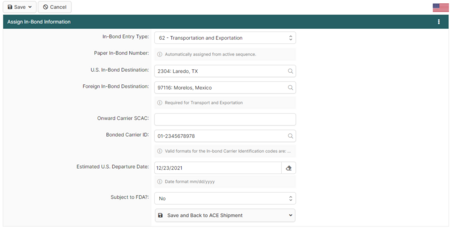
| | Mastering the ACE In-Bond process is essential for carriers moving goods through the United States without paying duties. This guide breaks down the critical <strong>Assign In-Bond Information</strong> screen, showing you exactly how to configure the <strong>Entry Type</strong> (such as 61 IT or 62 T&E), manage paper in-bond numbers, and set the correct Foreign Destination to ensure full CBP compliance. |
| * [[Customs_Glossary_Guide|Acronyms & glossary]] | | </p> |
| | |
| | <p style="max-width: none;"> |
| | When creating an ACE Shipment that requires in-bond information, this screen allows you to add the necessary <strong>Entry Number</strong> and <strong>Foreign Destination</strong> data required for a successful transmission. Understanding these fields prevents rejected manifests and ensures your goods move seamlessly across the border under customs control. |
| | [[ACE_In_Bond_(CBP_Shipment_Type)|<span style="font-weight: bold; color: #266065; margin-left: 5px;">Read More...</span>]] |
| | </p> |
| </div> | | </div> |
| | |
| </div> | | </div> |
| </div> | | </div> |
|
| |
|
| <!-- FEATURED SCREENSHOT (KEEP) -->
| | <div class="bc-hero" style="margin-top:40px; padding:30px; background:white; color:var(--bc-text); border:1px solid var(--bc-border); box-shadow:none;"> |
| <div class="bc-card bc-accent-soft" style="margin-top:14px;"> | | <h2 style="color:var(--bc-text); border:none;">Connect with BorderConnect</h2> |
| <h2>Featured BorderConnect Screenshot</h2>
| | <div class="bc-linkgrid"> |
| <div class="bc-inlineimg" style="margin-top:10px;">
| |
| [[image:Aceinbond3.png|700px|center]]
| |
| </div>
| |
| <div style="padding-top: 10px;" class="bc-subtle">
| |
| This BorderConnect screenshot is of the '''Assign ACE In-Bond Information''' page when creating an '''[[ACE_In_Bond_(CBP_Shipment_Type)|ACE In-Bond]]''' in BorderConnect. It is accessed when creating an ACE Shipment that requires in-bond information to be added to the shipment.
| |
|
| |
|
| This page allows the user to add specific information to an ACE shipment related to an ACE In-Bond, such as adding the in-bond entry type, adding an in-bond entry number, a U.S. in-bond destination, a foreign destination if it qualifies as a type-62 Transportation and Exportation bond, bonded carrier ID, departure data and other required bond information.
| | <div class="bc-linktile">[https://www.borderconnect.com <span class="bc-linkicon">{{Icon|globe|color=#266065}}</span><span class="bc-linktext"><span class="bc-linktitle">Website</span><span class="bc-linkdesc">Official Product Info</span></span>]</div> |
|
| |
|
| The Assign In-Bond Information page is required when in-bond shipments are created and submitted in the ACE system, as opposed to a customs broker filing them using ABI. [[ACE_In_Bond_(CBP_Shipment_Type)|('''Full article...''')]]
| | <div class="bc-linktile">[https://www.facebook.com/BorderConnect <span class="bc-linkicon">{{Icon|facebook|type=fa-brands|color=#266065}}</span><span class="bc-linktext"><span class="bc-linktitle">Facebook</span><span class="bc-linkdesc">News & Community</span></span>]</div> |
| </div>
| |
| </div> | |
|
| |
|
| <!-- OTHER AREAS (KEEP) + ADD RELEVANT SECTIONS --> | | <div class="bc-linktile">[https://www.instagram.com/borderconnect/ <span class="bc-linkicon">{{Icon|instagram|type=fa-brands|color=#266065}}</span><span class="bc-linktext"><span class="bc-linktitle">Instagram</span><span class="bc-linkdesc">Behind the Scenes</span></span>]</div> |
| <div class="bc-grid" style="margin-top:14px;"> | |
|
| |
|
| <div class="bc-card bc-accent-ref bc-cleanlist">
| | <div class="bc-linktile">[https://bsky.app/profile/borderconnect.com <span class="bc-linkicon">{{Icon|bluesky|type=fa-brands|color=#266065}}</span><span class="bc-linktext"><span class="bc-linktitle">Bluesky</span><span class="bc-linkdesc">Industry Updates</span></span>]</div> |
| <h2>Other Areas of BorderConnect Wiki</h2>
| |
| <div id="mp-other-content">
| |
| *'''[[PARS_Checking_Software_User_Guide_(CBSA_Shipments)|RNS-PARS Software Guide]]''' – Learn how to use all the features of BorderConnect RNS-PARS Software.
| |
| *'''[[Warehouse_Arrival_Certification_Message_(WACM)_Guide_(CBSA)|Warehouse Arrival Certification Message (WACM) Guide]]''' – Information guide about using BorderConnect's (WACM) feature with RNS.
| |
| *'''[[Customs_Compliance_Guide_(CBP_and_CBSA)|Customs Compliance Guide]]''' – General Information on getting cross-border authority and details about trusted trader programs.
| |
| *'''[[EManifest_Processing_Guide_(ACE_and_ACI_eManifest)|eManifest Processing Guide]]''' – Learn how to fill out BorderConnect fax forms and send your eManifest info to us.
| |
| *'''[[Service_Provider_Guide_(ACE_and_ACI_eManifest)|eManifest Service Provider Guide]]''' – This guide offers instructions on using BorderConnect as an eManifest Service Provider.
| |
| *'''[[Shipment_Types_For_ACE_and_ACI_eManifest|Shipment Release Types]]''' – View all CBP and CBSA shipment release types and their definitions and requirements.
| |
| *'''[[Customs_Glossary_Guide|Customs Glossary]]''' – A glossary of customs terms and acronyms used in cross-border trade and BorderConnect.
| |
| *'''[[Import_Wizard_(ACE_and_ACI_eManifest)|File Import Wizard Guide]]''' – The File Import Wizard helps users import eManifest data into BorderConnect.
| |
| </div>
| |
|
| |
|
| <h3>Quick reference</h3>
| | <div class="bc-linktile">[https://www.youtube.com/@BorderConnect <span class="bc-linkicon">{{Icon|youtube|type=fa-brands|color=#266065}}</span><span class="bc-linktext"><span class="bc-linktitle">YouTube</span><span class="bc-linkdesc">Video Tutorials</span></span>]</div> |
| * [[CBSA Highway Ports|CBSA Ports]]
| |
| * [[CBP Highway Ports|CBP Ports]]
| |
| * [[Shipment_Types_For_ACE_and_ACI_eManifest|Shipment Types]]
| |
| * [[Customs_Glossary_Guide|Glossary]]
| |
| </div>
| |
|
| |
|
| <div class="bc-card bc-accent-ref">
| | <div class="bc-linktile">[https://www.linkedin.com/company/borderconnect <span class="bc-linkicon">{{Icon|linkedin|type=fa-brands|color=#266065}}</span><span class="bc-linktext"><span class="bc-linktitle">LinkedIn</span><span class="bc-linkdesc">Company News</span></span>]</div> |
| <h2>BorderConnect On The Internet</h2>
| |
| <div class="bc-subtle">
| |
| The BorderConnect Wiki is compiled, written and maintained by employees of BorderConnect for the purpose of helping cross-border highway carriers get the information they need to stay informed and compliant.
| |
| </div>
| |
|
| |
|
| <div style="margin-top:12px;">
| | <div class="bc-linktile">[https://www.borderprint.com <span class="bc-linkicon">{{Icon|print|color=#266065}}</span><span class="bc-linktext"><span class="bc-linktitle">BorderPrint</span><span class="bc-linkdesc">Forms, Labels & Seals</span></span>]</div> |
| <ul id="sister-projects-list">
| |
| <li>
| |
| <div>[[File:Borderconnect-icon.jpg|35px|link=https://www.borderconnect.com|BorderConnect|alt=BorderConnect logo]]</div>
| |
| <div><span>[https://www.borderconnect.com '''BorderConnect''']</span><br/>Visit BorderConnect</div>
| |
| </li>
| |
| <li>
| |
| <div>[[File:Borderconnect-youtube-icon.png|35px|link=https://www.youtube.com/c/borderconnectofficial|YouTube|alt=BorderConnect on YouTube]]</div>
| |
| <div><span>[https://www.youtube.com/c/borderconnectofficial '''YouTube''']</span><br/>BorderConnect on YouTube</div>
| |
| </li>
| |
| <li>
| |
| <div>[[File:Borderconnect-facebook-icon.png|35px|link=https://www.facebook.com/borderconnect|Facebook|alt=BorderConnect on Facebook]]</div>
| |
| <div><span>[https://www.facebook.com/borderconnect '''Facebook''']</span><br/>BorderConnect on Facebook</div>
| |
| </li>
| |
| <li>
| |
| <div>[[File:Borderconnect-bluesky-logo.jpg|35px|link=https://bsky.app/profile/borderconnect.com|Bluesky|alt=BorderConnect on Bluesky]]</div>
| |
| <div><span>[https://bsky.app/profile/borderconnect.com '''Bluesky''']</span><br/>BorderConnect on Bluesky</div>
| |
| </li>
| |
| <li>
| |
| <div>[[File:Borderconnect-linkedin-icon.png|35px|link=https://www.linkedin.com/company/borderconnect|Linkedin|alt=BorderConnect on Linkedin]]</div>
| |
| <div><span>[https://www.linkedin.com/company/borderconnect '''Linkedin''']</span><br/>BorderConnect on Linkedin</div>
| |
| </li>
| |
| <li>
| |
| <div>[[File:Borderprint-icon.jpg|35px|link=https://www.borderprint.com|BorderPrint|alt=BorderPrint logo]]</div>
| |
| <div><span>[https://www.borderprint.com '''BorderPrint''']</span><br/>Visit BorderPrint</div>
| |
| </li>
| |
| </ul>
| |
| </div>
| |
|
| |
|
| </div>
| | <div class="bc-linktile">[https://emanifest.app <span class="bc-linkicon">{{Icon|mobile-alt|color=#266065}}</span><span class="bc-linktext"><span class="bc-linktitle">eManifest App</span><span class="bc-linkdesc">iOS & Android</span></span>]</div> |
|
| |
|
| | </div> |
| </div> | | </div> |
|
| |
|
| </div> | | </div> |