
Main Page: Difference between revisions
Tag: Undo |
No edit summary |
||
| Line 9: | Line 9: | ||
<p>Search the BorderConnect Knowledge Base or browse the guides below.</p> | <p>Search the BorderConnect Knowledge Base or browse the guides below.</p> | ||
<div | <div class="bc-search-container" style="max-width: 500px; margin: 0 auto;"> | ||
<span class="plainlinks"> | |||
[[Special:Search| | |||
<div style="background: white; padding: 15px 20px; border-radius: 30px; box-shadow: 0 4px 6px rgba(0,0,0,0.2); text-align: left; color: #888; font-size: 16px; cursor: pointer; transition: transform 0.2s;"> | |||
<span style="float: right; color: #005696; font-weight: bold;">Search</span> | |||
🔍 Search for "In-Bond", "ACE Manifest"... | |||
</div> | |||
]] | |||
</span> | |||
</div> | |||
<div class="bc-meta"> | <div class="bc-meta"> | ||
| Line 16: | Line 25: | ||
</div> | </div> | ||
<div class="bc- | <div class="bc-2col"> | ||
<div class="bc-card"> | <div class="bc-card"> | ||
| Line 27: | Line 36: | ||
[[BorderConnect_Onboarding_and_Readiness_Guide|Readiness Guide]] | [[BorderConnect_Onboarding_and_Readiness_Guide|Readiness Guide]] | ||
</div> | </div> | ||
<div class="bc-btn"> | <div class="bc-btn"> | ||
<strong>Step 2: Registering</strong> | <strong>Step 2: Registering</strong> | ||
[[How_To_Register_With_BorderConnect|Register Account]] | [[How_To_Register_With_BorderConnect|Register Account]] | ||
</div> | </div> | ||
<div class="bc-btn"> | <div class="bc-btn"> | ||
<strong>Step 3: The Basics</strong> | <strong>Step 3: The Basics</strong> | ||
[[BorderConnect_Software_User_Guide|Software User Guide]] | [[BorderConnect_Software_User_Guide|Software User Guide]] | ||
</div> | </div> | ||
<div class="bc-btn"> | <div class="bc-btn"> | ||
<strong>Step 4: First ACI</strong> | <strong>Step 4: First ACI</strong> | ||
[[Creating_and_Submitting_a_New_ACI_eManifest_(ACI_eManifest)|Create ACI Manifest]] | [[Creating_and_Submitting_a_New_ACI_eManifest_(ACI_eManifest)|Create ACI Manifest]] | ||
</div> | </div> | ||
<div class="bc-btn"> | <div class="bc-btn"> | ||
<strong>Step 5: First ACE</strong> | <strong>Step 5: First ACE</strong> | ||
| Line 69: | Line 74: | ||
</div> | </div> | ||
<div class="bc-card"> | </div> | ||
<div class="bc-card" style="margin-bottom: 30px;"> | |||
<h2>📺 Video Tutorials</h2> | <h2>📺 Video Tutorials</h2> | ||
<div class="bc-subtle">Watch step-by-step walkthroughs to master the platform.</div> | <div class="bc-subtle">Watch step-by-step walkthroughs to master the platform.</div> | ||
<div class="bc-2col" style=" | <div class="bc-2col" style="margin-bottom: 0; align-items: center;"> | ||
<div class="bc-cleanlist"> | <div class="bc-cleanlist"> | ||
* [https://www.youtube.com/watch?v=BHFylIHdtXc&list=PLQOGduPMk-2bXZWioPJEkh9f2uzlEOZQG ACI eManifest Tutorials] | * [https://www.youtube.com/watch?v=BHFylIHdtXc&list=PLQOGduPMk-2bXZWioPJEkh9f2uzlEOZQG ACI eManifest Tutorials] | ||
* [https://www.youtube.com/watch?v=qA1bJAuAUTI&list=PLQOGduPMk-2al0wBZZ4QEtbkZie0R-lFU ACE Manifest Tutorials] | * [https://www.youtube.com/watch?v=qA1bJAuAUTI&list=PLQOGduPMk-2al0wBZZ4QEtbkZie0R-lFU ACE Manifest Tutorials] | ||
* [https://www.youtube.com/playlist?list=PLQOGduPMk-2Yz8S-4Ft-ssBXi3lm1gYln U.S. In-Bond Tutorials] | * [https://www.youtube.com/playlist?list=PLQOGduPMk-2Yz8S-4Ft-ssBXi3lm1gYln U.S. In-Bond Tutorials] | ||
* [https://www.youtube.com/playlist?list=PLQOGduPMk-2YrdzXavRyI__exPjr-ZHVE General Software Tutorials] | * [https://www.youtube.com/playlist?list=PLQOGduPMk-2YrdzXavRyI__exPjr-ZHVE General Software Tutorials] | ||
* [https://www.youtube.com/@BorderConnect | * [https://www.youtube.com/@BorderConnect '''Browse All Playlists'''] | ||
</div> | </div> | ||
<div style=" | <div style="text-align: center;"> | ||
<div style="font-weight:bold; margin-bottom: | <div style="font-weight:bold; margin-bottom:5px; color:#555; font-size:0.9em;">Featured: QP In-Bond Filing</div> | ||
{{#ev:youtube|p-RKs3izmCs|340 | {{#ev:youtube|p-RKs3izmCs|340}} | ||
</div> | </div> | ||
</div> | |||
</div> | </div> | ||
<div class="bc-2col"> | <div class="bc-2col"> | ||
| Line 97: | Line 102: | ||
<h2>🇨🇦 ACI eManifest Guide</h2> | <h2>🇨🇦 ACI eManifest Guide</h2> | ||
<div class="bc-subtle">Comprehensive docs for CBSA (Canada) shipments.</div> | <div class="bc-subtle">Comprehensive docs for CBSA (Canada) shipments.</div> | ||
* [[Creating_and_Submitting_a_New_ACI_eManifest_(ACI_eManifest)|Creating and Submitting ACI]] | * [[Creating_and_Submitting_a_New_ACI_eManifest_(ACI_eManifest)|Creating and Submitting ACI]] | ||
* [[Correcting Rejected ACI eManifests (ACI eManifest)|Troubleshoot Rejections]] | * [[Correcting Rejected ACI eManifests (ACI eManifest)|Troubleshoot Rejections]] | ||
| Line 113: | Line 117: | ||
<h2>🇺🇸 ACE Manifest Guide</h2> | <h2>🇺🇸 ACE Manifest Guide</h2> | ||
<div class="bc-subtle">Comprehensive docs for CBP (USA) shipments.</div> | <div class="bc-subtle">Comprehensive docs for CBP (USA) shipments.</div> | ||
* [[Creating_and_Submitting_a_New_ACE_Manifest_(ACE_Manifest)|Creating and Submitting ACE]] | * [[Creating_and_Submitting_a_New_ACE_Manifest_(ACE_Manifest)|Creating and Submitting ACE]] | ||
* [[Correcting_Rejected_ACE_Manifests_(ACE_Manifest)|Troubleshoot Rejections]] | * [[Correcting_Rejected_ACE_Manifests_(ACE_Manifest)|Troubleshoot Rejections]] | ||
| Line 127: | Line 130: | ||
</div> | </div> | ||
<div class="bc-2col"> | <div class="bc-2col"> | ||
| Line 132: | Line 136: | ||
<h2>🚛 U.S. In-Bond Manager</h2> | <h2>🚛 U.S. In-Bond Manager</h2> | ||
<div class="bc-subtle">QP In-Bonds, Diversions, and Arrivals.</div> | <div class="bc-subtle">QP In-Bonds, Diversions, and Arrivals.</div> | ||
* [[US_In_Bond_Manager_Guide_(CBP)|User Guide Overview]] | * [[US_In_Bond_Manager_Guide_(CBP)|User Guide Overview]] | ||
* [[In_Bond_Manager_Dashboard_(U.S._In-Bond_Manager)|The Dashboard]] | * [[In_Bond_Manager_Dashboard_(U.S._In-Bond_Manager)|The Dashboard]] | ||
| Line 142: | Line 145: | ||
<h2>⚙️ Advanced Tools</h2> | <h2>⚙️ Advanced Tools</h2> | ||
<div class="bc-subtle">Admin, Fleet Management, and RNS.</div> | <div class="bc-subtle">Admin, Fleet Management, and RNS.</div> | ||
* [[Creating_and_Maintaining_Truck_Profiles_(ACE_and_ACI_eManifest)|Manage Trucks]] & [[Creating_and_Maintaining_Driver_Profiles_(ACE_and_ACI_eManifest)|Drivers]] | * [[Creating_and_Maintaining_Truck_Profiles_(ACE_and_ACI_eManifest)|Manage Trucks]] & [[Creating_and_Maintaining_Driver_Profiles_(ACE_and_ACI_eManifest)|Drivers]] | ||
* [[PARS_Checking_Software_User_Guide_(CBSA_Shipments)|RNS-PARS Software]] | * [[PARS_Checking_Software_User_Guide_(CBSA_Shipments)|RNS-PARS Software]] | ||
Revision as of 15:28, 30 January 2026
How can we help you?
Search the BorderConnect Knowledge Base or browse the guides below.
🚀 New to BorderConnect?
Start here to get compliant fast with the least friction.
Step 1: Onboarding Readiness Guide
Step 2: Registering Register Account
Step 3: The Basics Software User Guide
Step 4: First ACI Create ACI Manifest
Step 5: First ACE Create ACE Manifest
⚡ Common Tasks
Quick links to what you are trying to accomplish today.
💡 Pro Tip
Use the search bar above to find specific Error Codes (e.g., "Differs from bill") to find instant solutions.
📺 Video Tutorials
Watch step-by-step walkthroughs to master the platform.
Featured: QP In-Bond Filing
🇨🇦 ACI eManifest Guide
Comprehensive docs for CBSA (Canada) shipments.
- Creating and Submitting ACI
- Troubleshoot Rejections
- Creating In-Bond (Canada)
- Shipment Types (PARS, etc.)
- CBSA Port Codes
Did you know?
An ACI Lead Sheet is required for every entry. BorderConnect can auto-generate these for you.
🇺🇸 ACE Manifest Guide
Comprehensive docs for CBP (USA) shipments.
- Creating and Submitting ACE
- Troubleshoot Rejections
- Creating In-Bond (USA)
- Shipment Types (PAPS, etc.)
- CBP Port Codes
Did you know?
Insurance Policies are mandatory if you are hauling hazardous goods into the U.S.
🚛 U.S. In-Bond Manager
QP In-Bonds, Diversions, and Arrivals.
⚙️ Advanced Tools
Admin, Fleet Management, and RNS.
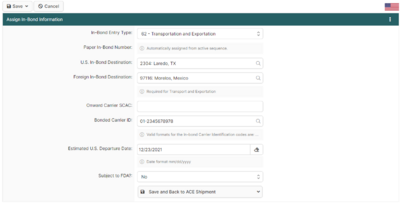
Featured: Assigning ACE In-Bond Info
This screen is critical when creating an ACE Shipment that requires in-bond information. It allows you to add the **Entry Type**, **Entry Number**, and **Foreign Destination**.
Read the full article →