
Main Page: Difference between revisions
No edit summary |
No edit summary Tag: Reverted |
||
| Line 114: | Line 114: | ||
</div> | </div> | ||
</div> | </div> | ||
ok looking better, now just have the video thumbnail to be larger and float it to the left side of the card | |||
{{AppPromo}} | {{AppPromo}} | ||
Revision as of 17:58, 6 February 2026
How can we help you?
Search the BorderConnect Knowledge Base or browse the guides below.
New to BorderConnect?
Step 1: Onboarding Readiness Guide
Step 2: Registering Register Account
Step 3: The Basics Software User Guide
Step 4: First ACI Create ACI Manifest
Step 5: First ACE Create ACE Manifest
Common Tasks
ok looking better, now just have the video thumbnail to be larger and float it to the left side of the card
ACI eManifest Guide
- Creating and Submitting ACI
- Troubleshoot Rejections
- Creating In-Bond (Canada)
- Shipment Types (PARS, etc.)
- CBSA Port Codes
Did you know?
An ACI Lead Sheet is required for every entry. BorderConnect can auto-generate these for you.
ACE Manifest Guide
- Creating and Submitting ACE
- Troubleshoot Rejections
- Creating In-Bond (USA)
- Shipment Types (PAPS, etc.)
- CBP Port Codes
Did you know?
Insurance Policies are mandatory if you are hauling hazardous goods into the U.S.
U.S. In-Bond Manager
Did you know?
If a driver needs to change destinations after arriving in the U.S., you must file a Port Diversion rather than canceling the bond.
Advanced Tools
Did you know?
BorderConnect RNS-PARS can automatically send text messages or emails to your drivers the exact moment their shipment is released by CBSA.
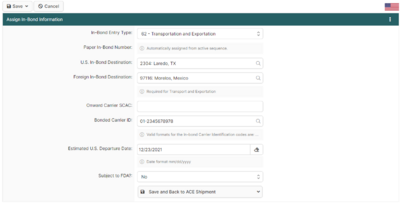
Featured: Assigning ACE In-Bond Info
This screen is critical when creating an ACE Shipment that requires in-bond information. It allows you to add the **Entry Type**, **Entry Number**, and **Foreign Destination**.
Read the full article →