
Main Page: Difference between revisions
No edit summary |
No edit summary |
||
| Line 231: | Line 231: | ||
<div class="bc-linktile">[https://www.borderprint.com <span class="bc-linkicon">{{Icon|print|color=#266065}}</span><span class="bc-linktext"><span class="bc-linktitle">BorderPrint</span><span class="bc-linkdesc">Forms, Labels & Seals</span></span>]</div> | <div class="bc-linktile">[https://www.borderprint.com <span class="bc-linkicon">{{Icon|print|color=#266065}}</span><span class="bc-linktext"><span class="bc-linktitle">BorderPrint</span><span class="bc-linkdesc">Forms, Labels & Seals</span></span>]</div> | ||
<div class="bc-linktile">[https://www.borderconnect.com/contact-us.htm <span class="bc-linkicon">{{Icon|headset|color=#266065}}</span><span class="bc-linktext"><span class="bc-linktitle">Support</span><span class="bc-linkdesc">24/7 Live Help</span></span>]</div> | |||
</div> | </div> | ||
Revision as of 13:42, 4 February 2026
How can we help you?
Search the BorderConnect Knowledge Base or browse the guides below.
New to BorderConnect?
Step 1: Onboarding Readiness Guide
Step 2: Registering Register Account
Step 3: The Basics Software User Guide
Step 4: First ACI Create ACI Manifest
Step 5: First ACE Create ACE Manifest
Common Tasks
Video Tutorials
ACI eManifest Guide
- Creating and Submitting ACI
- Troubleshoot Rejections
- Creating In-Bond (Canada)
- Shipment Types (PARS, etc.)
- CBSA Port Codes
Did you know?
An ACI Lead Sheet is required for every entry. BorderConnect can auto-generate these for you.
ACE Manifest Guide
- Creating and Submitting ACE
- Troubleshoot Rejections
- Creating In-Bond (USA)
- Shipment Types (PAPS, etc.)
- CBP Port Codes
Did you know?
Insurance Policies are mandatory if you are hauling hazardous goods into the U.S.
U.S. In-Bond Manager
Did you know?
If a driver needs to change destinations after arriving in the U.S., you must file a Port Diversion rather than canceling the bond.
Advanced Tools
Did you know?
BorderConnect RNS-PARS can automatically send text messages or emails to your drivers the exact moment their shipment is released by CBSA.
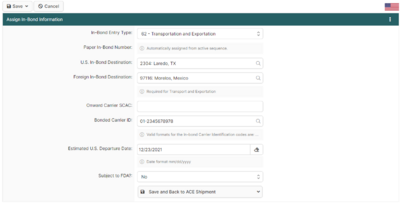
Featured: Assigning ACE In-Bond Info
This screen is critical when creating an ACE Shipment that requires in-bond information. It allows you to add the **Entry Type**, **Entry Number**, and **Foreign Destination**.
Read the full article →