
Main Page: Difference between revisions
No edit summary Tag: Reverted |
Tag: Undo |
||
| Line 114: | Line 114: | ||
</div> | </div> | ||
</div> | </div> | ||
<div class="bc-card" style="margin-bottom: 30px;"> | |||
<h2>{{Icon|circle-play|color=#266065}} Video Tutorials</h2> | |||
<div class="bc-subtle">Watch step-by-step walkthroughs to master the platform.</div> | |||
<div class="bc-2col" style="margin-bottom: 0; align-items: center;"> | |||
<div class="bc-cleanlist"> | |||
<ul> | |||
<li>[https://www.youtube.com/watch?v=BHFylIHdtXc&list=PLQOGduPMk-2bXZWioPJEkh9f2uzlEOZQG ACI eManifest Tutorials]</li> | |||
<li>[https://www.youtube.com/watch?v=qA1bJAuAUTI&list=PLQOGduPMk-2al0wBZZ4QEtbkZie0R-lFU ACE Manifest Tutorials]</li> | |||
<li>[https://www.youtube.com/playlist?list=PLQOGduPMk-2Yz8S-4Ft-ssBXi3lm1gYln U.S. In-Bond Tutorials]</li> | |||
<li>[https://www.youtube.com/playlist?list=PLQOGduPMk-2YrdzXavRyI__exPjr-ZHVE General Software Tutorials]</li> | |||
<li>[https://www.youtube.com/@BorderConnect '''Visit BorderConnect YouTube Channel''']</li> | |||
</ul> | |||
</div> | |||
<div> | |||
<div class="bc-video-caption" style="margin-bottom: 10px; margin-top: 0;"><strong>Featured:</strong> QP In-Bond Filing</div> | |||
<div class="bc-video-trigger" data-video-id="p-RKs3izmCs"> | |||
<div class="bc-play-icon"><i class="fas fa-play-circle"></i></div> | |||
</div> | |||
</div> | |||
</div> | |||
</div> | |||
{{AppPromo}} | {{AppPromo}} | ||
Revision as of 17:58, 6 February 2026
How can we help you?
Search the BorderConnect Knowledge Base or browse the guides below.
New to BorderConnect?
Step 1: Onboarding Readiness Guide
Step 2: Registering Register Account
Step 3: The Basics Software User Guide
Step 4: First ACI Create ACI Manifest
Step 5: First ACE Create ACE Manifest
Common Tasks
Video Tutorials
ACI eManifest Guide
- Creating and Submitting ACI
- Troubleshoot Rejections
- Creating In-Bond (Canada)
- Shipment Types (PARS, etc.)
- CBSA Port Codes
Did you know?
An ACI Lead Sheet is required for every entry. BorderConnect can auto-generate these for you.
ACE Manifest Guide
- Creating and Submitting ACE
- Troubleshoot Rejections
- Creating In-Bond (USA)
- Shipment Types (PAPS, etc.)
- CBP Port Codes
Did you know?
Insurance Policies are mandatory if you are hauling hazardous goods into the U.S.
U.S. In-Bond Manager
Did you know?
If a driver needs to change destinations after arriving in the U.S., you must file a Port Diversion rather than canceling the bond.
Advanced Tools
Did you know?
BorderConnect RNS-PARS can automatically send text messages or emails to your drivers the exact moment their shipment is released by CBSA.
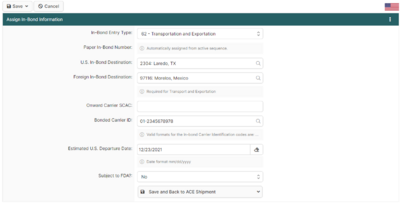
Featured: Assigning ACE In-Bond Info
This screen is critical when creating an ACE Shipment that requires in-bond information. It allows you to add the **Entry Type**, **Entry Number**, and **Foreign Destination**.
Read the full article →